Gear Report by Kip Staton
Shooters in the market for an accurate anemometer that doesn’t break the bank need to take a hard look at the WeatherFlow Wind Meter, which retails on Amazon.com for just $34.95. Even though it is inexpensive, owner reviews have been overwhelmingly postive (so long as the software is compatible with your device). One Amazon reviewer says the WeatherFlow measures wind velocity as accurately as his expensive Kestrel.
A big part of the reason the WeatherFlow Wind Meter is so inexpensive is that you’ve probably already got the brains of the system in your pocket. Yes, it connects to and communicates with any standard smartphone or tablet, in either iOS or Android flavors. Users simply download the free WeatherFlow Wind Meter app to their smart device, insert the anemometer into the headphone jack, and can immediately start measuring the wind.
Of course, the first question any serious shooter will ask is “How accurate is this thing?” Pretty dang accurate, as it turns out. The device was calibrated by the University of Florida’s Aerospace Engineering Department, and the unique design allows it to consistently report to within a half a percentage point of the true wind value, even if the breeze is up to 15 degrees off-axis to the meter.
Wind speeds are measurable from as slow as two miles per hour to as high as 125 MPH. The Wind Meter outputs average, lull, and gusts windspeed data to your phone, with velocities indicated in 0.1 MPH increments. Furthermore, a hard-sided protective case is included for safe transportation.
Naturally, since the WeatherFlow Wind Meter is App-based, it’s connectable to a variety of social media websites and distribution sources. This makes saving and sharing information about climate conditions a breeze.
About the Writer
Kip Staton is a freelance gun writer based in North Texas, and loves to blog about news within the firearms industry and his perceptions on marksmanship at KipStaton.com. He served as the weekend range manager of the North Texas Shooter’s Association from 2010-2012, at which point he began performing sales consultations for a major online firearms retailer. Currently, Kip is a content marketer, copywriter and digital strategist for an award-winning Dallas marketing agency.
To read more gear reviews by Kip, visit KipStaton.com.
Looking for a shooting range near you? There’s a new mobile App for that. The National Shooting Sports Foundation (NSSF) has released an all-new Where To Shoot mobile App that locates shooting ranges. This App is offered for Android devices as well as Apple iPhones and iPads.
Available for free in the Apple App Store and Google’s Android App Store, Where To Shoot puts North America’s most comprehensive directory of shooting ranges in the palm of your hand. It also includes video tips for shooters, news and firearm-safety information.
Users can search by current location or zip code and find specifics about each range, including shooting activities offered, accessibility and contact information. The app also makes it easy to get directions to the range.
The app is modeled after NSSF’s popular WhereToShoot.org® website and is updated frequently with range information in every U.S. state and Canadian province. New tips for hunters and shooters are also added regularly.
Carl Zeiss Sports Optics (Zeiss) has a new mobile Ballistics Calculator App for iOS (Apple) and Android devices. Modeled after the web-based Zeiss Ballistics Calulator, the new Mobile App is tailored to work precisely with Zeiss Ballistic reticles. Mike Jensen of Carl Zeiss Sports Optics explained: “We wanted those who use our proprietary ballistic reticles to have a ballistic tool that could be used virtually anywhere you have a signal for your device.”
The Zeiss Ballistic Calculator App allows users to pick their ballistic reticle from a drop-down menu. The user also has the ability to select factory or hand load data as well as environmental variables, and then the system will calculate and display the optimum magnification setting. With this system, distant yardages now coincide with the Zeiss ballistic reticle subtensions. The system allows the user to adjust standard settings for altitude and temperature, as well as other advanced settings, e.g. for muzzle velocity and sight height above bore.
Zeiss Ballistics Calculator App Features:
– One page screen application for fast data entry and easy to read results.
– Comprehensive and current database for factory and hand-loaded ammunition.
– Adjustable settings to customize unique shooting environments.
– Slide feature to visualize how magnification change alters point of impact.
The Zeiss Mobile Ballistic Calculator App can be downloaded at Google Play (Android App) and iTunes (iPhone App) for $4.99. Zeiss has noted that the App will soon be updated to include the Zeiss ASV ballistic turret system.
iPhone and iPad users rejoice. The Apple iOS version of the Applied Ballistics Mobile App is now available. It has all the features of the much-loved Applied Ballistics Android App with full Apple functionality. This mobile App will run on iPhones, iPods, and iPads.
The new iOS mobile App accounts for all major and minor trajectory variables that a shooter could encounter. Conveniently, the App displays single-shot solutions in HUD View or Reticle View.
Real-World Calibration — Shooters can enter their observed drops and the program will calibrate and “true” the predictions based on actual bullet impact. This is done by incorporating muzzle velocity and drop-scaling over various segments of the trajectory.
Sync to Web — A web-sync feature allows you to store your rifle and ammunition libraries online. And you can backup all the profiles online or restore them to a device.
Forum member Snuggie308, who acquired the new iOS App, gives it a thumbs up: “I bought it last night. It is a great tool. There’s a massive data base … built into it. You can’t find a better [mobile ballistics app] in my opinion.” Snuggie308 also reports that the new iOS is iPad friendly, and fills the iPad screen so it is easy to use all the features.
The Applied Ballistics iOS Mobile App runs the state-of-the-art Point Mass ballistic solver. This solver, along with the built-in library of ballistic coefficients, makes this the most accurate, precise, and complete mobile ballistics app available for iOS devices.
Ballistician (and former missile design engineer) Bryan Litz wrote this solver. The program integrates the equations of ballistic motion numerically, using a 4th-order Runge-Kutta method, the preferred method of solving dynamic equations for aircraft and missiles. The application also comes with G1 and G7 BCs for over 1,300 bullet types.
Bryan Litz tells us: “We have worked extensively on this product. With the success of the Android version of the application, released two years ago, the demand for the iOS version has been high. We are excited to now offer a full-featured iOS version that runs on iPhones, iPods, and iPads.”
Available now through iTunes, the Applied Ballistics Mobile App costs $29.99, and requires iOS 7.0 or later for proper functionality. Compatible with iPhone, iPad, and iPod touch devices, this App is optimized for the iPhone 5 series of smart phones.
The NSSF’s Where To Shoot mobile App has topped 100,000 downloads. The app, which rose to No. 4 on the Apple App Store’s list of free sports Apps, has been a hit with target shooters and gun owners. It is available FREE for both iOS (Apple) and Android devices.
The Where To Shoot App quickly and easily locates shooting ranges near you, drawing on North America’s most comprehensive directory of shooting ranges. Users can search by current location, state, or zip code and find specifics about each range, including shooting activities offered and contact information. Once you’ve location a place to shoot, the App helps you get directions to the range. The App also includes video tips for shooters, news, and firearm-safety information.
The app is modeled after NSSF’s popular WhereToShoot.org® website and is updated frequently with range information in every U.S. state and Canadian province. New tips for hunters and shooters are also added regularly. Download the app via the links above or by visiting wheretoshoot.org on your mobile device.
Free is good — especially when it’s a free digital magazine about precision shooting. The latest digital edition of the ISSF News Magazine is now offered for both iOS (Apple) and Android OS devices. The downloadable ISSF Magazine is packed with content about competition shooting worldwide. The most recent December 2013 edition includes 34 articles, over 500 photos, and several videos, plus exclusive reports from the ISSF World Cup Finals. Each ISSF eZine is “self-contained”. That means, once you download an issue, you read it start to finish, even without a live web connection.
The ISSF News Tablet Magazine can be downloaded for free, in English and German. Pick the version that suits your hardware — Apps are offered for both Android tablets and for iPads. Bimonthly issues are published in February, April, June, August, October and December.
The ISSF News Tablet Magazine covers precision shooting around the globe. Each issue spotlights top shooters and the latest hardware — rifles, sights, accessories, ammo. You’ll find up-to-date coverage of top-level competitions, and these match reports feature videos, slide shows, and other interactive features made possible by modern, touch-screen tablet technology.
Looking for a shooting range? There’s an App for that. The National Shooting Sports Foundation (NSSF) has released free Where-To-Shoot mobile Apps that locate shooting ranges. This App is offered for Android devices as well as Apple iPhones and iPads.
Available for free in the Apple App Store and Google’s Android App Store, the Where-To-Shoot Apps puts a comprehensive directory of shooting ranges in the palm of your hand. These Apps also include tips for shooters, news, and firearm-safety information.
Users can search by current location or zip code and find specifics about each range, including activities offered, directions, and contact info. The App Databases are updated regularly.
Many folks struggle when they sight-in a scoped rifle for the first time. A very common mistake is clicking the turrets in the wrong direction. That’s frustrating and it wastes ammo. Another common problem occurs when people sight-in at a distance other than 100 yards. People sometimes struggle to figure out how many clicks they need to correct point of impact if they’re zeroing at 200, 250, or 300 yards.
To make the sight-in process more fool-proof, AccuScope has released two handy Apps for smart phone users. Whether used for initial sight-in or in-the-field adjustments, these smartphone Apps can get you zeroed quickly and reliably.
Using the Apps is easy. First, boresight the gun to get on paper. After the gun is fouled-in (so it is shooting normally) shoot a carefully aimed 3-shot group. Then go to the target and measure the vertical and horizontal distance from the 3-shot group center to your aiming point. Input those numbers into the App, along with your sight-in distance (from muzzle to target). The App then calculates exactly how many elevation and/or windage clicks you must crank into your scope to move point-of-impact to point of aim. Put in the specified clicks and then take a fourth shot to confirm your zero. The fourth shot should impact right on your point of aim (within the limits of the gun’s inherent accuracy.)
Given Murphy’s Law, a shooter can still mess things up if he inputs left clicks when the App calls for right clicks, or inputs down clicks when he needs up clicks. But as long as you look at the “R/L” and “Up/Down” labels on your turrets before spinning the knobs, you shouldn’t have any problems.
AccuScope is available in two versions, Standard and Premium. The $4.99 Standard version works for 1/4 MOA-click-value scopes. The $9.99 Premium version works with all scopes and any click values. The Premium version works with 1/8 MOA clicks, 1/4 MOA clicks, Metric clicks, or Milrad segment click values. So, if you have a scope with 1/8 MOA clicks, you’ll need the Premium version.
AccuScope iPhone Apps are available through Apple’s App Store: Standard | Premium
AccuScope Android Apps are available through the AppBrain Store: Standard and Premium
Editor’s Comment: Does this App really provide a solution you can’t figure out yourself with simple arithmetic? No, but some math-challenged guys may find that the App prevents errors. Additionally, following the step-by-step process used by the App will probably help some shooters avoid confusion, and avoid wasting ammo clicking in the wrong directions.
Note however, that there is an even simpler way to zero, if you have a very solid front and rear rest that will hold the gun absolutely steady while you click. After bore-sighting, fire a couple rounds (with the same point of aim). Then place the rifle so the center of the cross-hairs is exactly on your original point of aim. Next, without disturbing the gun in any way, dial your turrets so that the center of the cross-hair moves over the center of your group. That’s it. You’re now zeroed (though you may want to repeat the process for confirmation). Again, this only works if the gun doesn’t shift one bit when you’re clicking. Having a helper steady the gun as you click the turrets will make this “no-math” method work more effectively.
Click-to-Initial POI Zeroing Method Demonstrated
Product Tip by EdLongrange. We welcome reader submissions.
Here’s good news for Applied Ballistics Mobile App users with Samsung smart-phones, running the latest OS. Bryan Litz reports: “For those who were experiencing problems with the Applied Ballistics Mobile app on the new Galaxy S4 devices, I’m happy to announce that the problem has been resolved. App users should have the update already — once you have a network connection, the App will check for the update, which will be pushed out to the device.”
If you use a balance-beam scale to weigh powder and reloading components, here’s a clever way to magnify the view of the beam tip. Of course you can use an old-fashioned magnifying glass, clamped in place, to upsize the view. But now there’s a parallax-free, electronic solution that works for anyone with an iPhone or Android OS smartphone.
Forum member Allan E. (aka “1066”) discovered that he could use the camera on his smartphone to display and magnify the image of a balance-beam tip. This works via a Magnifying Glass App you can download for free. Just turn on the smartphone, activate the Magnifying Glass App and zoom-in to suit your preference. Alan explains: “This saves those tired eyes. It’s much more accurate because there’s no parallax — the lens is directly in line with the pointer so we can see [the pointer] off the screen from any angle. It’s a much clearer view, and it costs nothing.”
You’ll need to fabricate some kind of stand or clamp for the phone. Allan created a smartphone mount with a bit of wire, rubber bands, and a bullet box. You can see the system working in the video below. (The video starts by showing a webcam + laptop balance-beam monitor system. The Smartphone system demo begins at the 1:30″ time-mark.)
Magnifying Glass Apps for iPhones and Android Phones
There are numerous ‘magnifying glass’ programs for Apple and Android smartphones that use the built-in camera. Most include a zoom function and auto-focus. You might try a couple different Apps and see which works best for you. Some perform better in low light, while others resolve better. All of the following have 4-star or better user ratings:


 Of course, the first question any serious shooter will ask is “How accurate is this thing?” Pretty dang accurate, as it turns out. The device was calibrated by the University of Florida’s Aerospace Engineering Department, and the unique design allows it to consistently report to within a half a percentage point of the true wind value, even if the breeze is up to 15 degrees off-axis to the meter.
 About the Writer
 Looking for a shooting range near you? There’s a new mobile App for that. The National Shooting Sports Foundation (NSSF) has released an all-new Where To Shoot mobile App that locates shooting ranges. This App is offered for Android devices as well as Apple iPhones and iPads.
 Carl Zeiss Sports Optics (Zeiss) has a new mobile


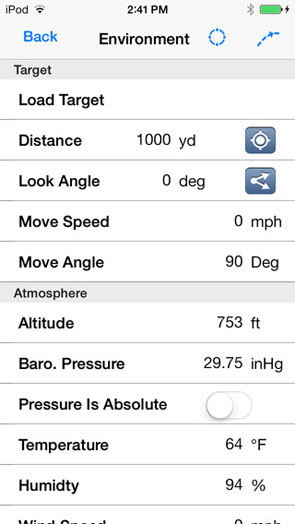


 Many folks struggle when they sight-in a scoped rifle for the first time. A very common mistake is clicking the turrets in the wrong direction. That’s frustrating and it wastes ammo. Another common problem occurs when people sight-in at a distance other than 100 yards. People sometimes struggle to figure out how many clicks they need to correct point of impact if they’re zeroing at 200, 250, or 300 yards.


 Magnifying Glass Apps for iPhones and Android Phones


