Here’s a scary development that could impact the privacy rights of firearms owners. The Federal Department of Justice (DOJ) has filed a legal request to compel tech companies Google and Apple to disclose information on over 10,000 persons who downloaded software Apps used to calibrate ATN night-vision scopes. The Feds say they need the info to track possible illegal exports of ATN scopes. Frankly, this is a dangerous precent. What comes next? Will the DOJ demand the names and emails of all Snipers’ Hide members, or all NRA members for that matter?
Forbes Magazine reports: “According to an application for a court order filed by the Department of Justice (DOJ) on September 5, investigators want information on users of Obsidian 4, a tool used to control rifle scopes made by night-vision specialist American Technologies Network Corp. [ATN]. The App allows gun owners to get a live stream, take video, and calibrate their gun scope from an Android or iPhone device. According to the Google Play page for Obsidian 4, it has more than 10,000 downloads. If the court approves the demand, and Apple and Google decide to hand over the information, it could include data on thousands of people who have nothing to do with the crimes being investigated, privacy activists warned. Edin Omanovic, lead on Privacy International’s State Surveillance program, said it would set a dangerous precedent and scoop up ‘huge amounts of innocent people’s personal data’.”
The purported purpose of the data harvest is to aid the U.S. Immigration and Customs Enforcement (ICE) agency track possible illegal exports of ATN Night Vision scopes. But this kind of sweeping information request is both over-broad and dangerous in its implications. Cybersecurity experts were stunned by the ICE request, according to Forbes Magazine:
Innocents Ensnared
The request is undeniably broad and would likely include all users of the app within America, not just users abroad who might indicate illegal shipments of the gun appendage. Tor Ekeland, a privacy-focused lawyer, said it amounted to a “fishing expedition.” “There’s a more profound issue here with the government able to vacuum up a vast amount of data on people they have no reason to suspect have committed any crime.” Ekeland added.
Even those who’ve worked in government surveillance were stunned by the order. “The idea that this data will only be used for pursuing ITAR violations is almost laughable,” warned Jake Williams, a former NSA analyst and now a cybersecurity consultant at Rendition Infosec.
Tired of hauling around an old-fashioned Score Book and making entries with pencil and paper? Well now you can go digital — Creedmoor Sports has released a full-featured Scoring Book App that lets you plot your shot locations using an iPhone, iPod, or iPad (Apple tablet). The price is right — just visit the iTunes store to download the App for FREE.
Record Match and Practice Data
This new App, available for free in the Apple App Store, provides all the same functions and capabilities of the traditional Creedmoor print Data Book, but with the convenience and ease of recording your match and practice information with your iPhone or tablet. With this App you can break your 20 shot slow-fire segments into either 10- or 20-shot targets, and also opt for sighting shots. All the specific event data can also be recorded, such as location, wind, light etc., along with wind and elevation adjustments.
COMMUNICATIONS Restrictions: In some matches you are not allowed to have electronic communication ability, so you may have to set your iPhone to “Airplane Mode”, or use this only with an iPod (which does not have two-way communication capability).
How would you like to be able to locate any rifle range in North America in a matter of seconds? That it now possible with the mobile Where To Shoot App, available FREE for both iOS (Apple) and Android devices.
The Where To Shoot App quickly locates shooting ranges near you, drawing on North America’s most comprehensive directory of shooting ranges. Users can search by current location, state, or zip code and find specifics about each range, including shooting activities offered. And once you locate a range with the App, you can call up a summary of range facilities and get driving directions to the range.
The app is modeled after NSSF’s popular WhereToShoot.org® website and is updated frequently with range information in every U.S. state and Canadian province. Once you’ve location a place to shoot, the App helps you get directions to the range. The App also includes video tips for shooters, news, and firearm-safety information.
Download the app via the links above or by visiting wheretoshoot.org on your mobile device.
The NSSF’s Where To Shoot mobile App has topped 100,000 downloads. The app, which rose to No. 4 on the Apple App Store’s list of free sports Apps, has been a hit with target shooters and gun owners nationwide. This can save you time when looking for a place to shoot.
Headed to SHOT Show next week? Then you should download the FREE SHOT Show Mobile App. Available for all mobile devices, this App really makes it easier to plan your SHOT Show schedule, and navigate the floor of the Sands Convention Center. The 2016 SHOT Show Mobile App is now available for download on Apple, Android, Blackberry and Windows smartphones and devices. Apple users will find the app in the App Store, Android users will find their version in the Google Play Store, and Blackberry and Windows users can CLICK HERE. Learn more about the App at SHOTmobile.com.
Handy Interactive Map
The App includes an interactive map that can direct you from your current location to your next destination. Arrange your meetings with a handy scheduling calendar. And you can search for any SHOT exhibitor by name or product category. In addition, the App lists major show events as well as important new products.
The Free SHOT Show App lets you do some very cool things with your smartphone. You can contact exhibitors directly through the App to request appointments or callbacks. You can take notes while visiting a vendor’s booth or attending a seminar. Of course you can schedule your agenda, and see an entire day’s events in a glance. But perhaps the best function of all is the “Smart Route”. This allows you to create the most efficient point to point route from one booth location to another.
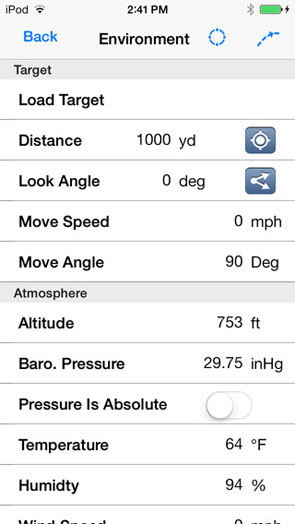
iPhone owners rejoice. The much-awaited iOS Ballistics App for the Kestrel LiNK Weather Meter is now available. Now you can sync your 5700 Series Kestrel wirelessly with your iPhone, iPod, or iPad. With Apple iOS devices being so popular among serious shooters, this is an important software release. Bryan Litz of Applied Ballistics was proud to announce the new development: “Kestrel LiNK Ballistics is now available for iOS! It has been available for Android, and was also recently updated to fix some issues. Android users should be on version 1.67 by now. We say thank you to those who have been patiently waiting for the iOS version”. The software is a FREE download from the Apple App Store. For supporting info and Users’ Guides for both iOS and Android versions, visit the Applied Ballistics Resource Site.
This App is designed to work with the new 5700-series Kestrel Elite Weather Meter (5700AL) or Kestrel Sportsman Weather Meter (5700SL) with LiNK, powered by Bluetooth Smart.
iPhone and iPad users rejoice. The Apple iOS version of the Applied Ballistics Mobile App is now available. It has all the features of the much-loved Applied Ballistics Android App with full Apple functionality. This mobile App will run on iPhones, iPods, and iPads.
The new iOS mobile App accounts for all major and minor trajectory variables that a shooter could encounter. Conveniently, the App displays single-shot solutions in HUD View or Reticle View.
Real-World Calibration — Shooters can enter their observed drops and the program will calibrate and “true” the predictions based on actual bullet impact. This is done by incorporating muzzle velocity and drop-scaling over various segments of the trajectory.
Sync to Web — A web-sync feature allows you to store your rifle and ammunition libraries online. And you can backup all the profiles online or restore them to a device.
Forum member Snuggie308, who acquired the new iOS App, gives it a thumbs up: “I bought it last night. It is a great tool. There’s a massive data base … built into it. You can’t find a better [mobile ballistics app] in my opinion.” Snuggie308 also reports that the new iOS is iPad friendly, and fills the iPad screen so it is easy to use all the features.
The Applied Ballistics iOS Mobile App runs the state-of-the-art Point Mass ballistic solver. This solver, along with the built-in library of ballistic coefficients, makes this the most accurate, precise, and complete mobile ballistics app available for iOS devices.
Ballistician (and former missile design engineer) Bryan Litz wrote this solver. The program integrates the equations of ballistic motion numerically, using a 4th-order Runge-Kutta method, the preferred method of solving dynamic equations for aircraft and missiles. The application also comes with G1 and G7 BCs for over 1,300 bullet types.
Bryan Litz tells us: “We have worked extensively on this product. With the success of the Android version of the application, released two years ago, the demand for the iOS version has been high. We are excited to now offer a full-featured iOS version that runs on iPhones, iPods, and iPads.”
Available now through iTunes, the Applied Ballistics Mobile App costs $29.99, and requires iOS 7.0 or later for proper functionality. Compatible with iPhone, iPad, and iPod touch devices, this App is optimized for the iPhone 5 series of smart phones.
The NSSF’s Where To Shoot mobile App has topped 100,000 downloads. The app, which rose to No. 4 on the Apple App Store’s list of free sports Apps, has been a hit with target shooters and gun owners. It is available FREE for both iOS (Apple) and Android devices.
The Where To Shoot App quickly and easily locates shooting ranges near you, drawing on North America’s most comprehensive directory of shooting ranges. Users can search by current location, state, or zip code and find specifics about each range, including shooting activities offered and contact information. Once you’ve location a place to shoot, the App helps you get directions to the range. The App also includes video tips for shooters, news, and firearm-safety information.
The app is modeled after NSSF’s popular WhereToShoot.org® website and is updated frequently with range information in every U.S. state and Canadian province. New tips for hunters and shooters are also added regularly. Download the app via the links above or by visiting wheretoshoot.org on your mobile device.
Looking for a shooting range? There’s an App for that. The National Shooting Sports Foundation (NSSF) has released free Where-To-Shoot mobile Apps that locate shooting ranges. This App is offered for Android devices as well as Apple iPhones and iPads.
Available for free in the Apple App Store and Google’s Android App Store, the Where-To-Shoot Apps puts a comprehensive directory of shooting ranges in the palm of your hand. These Apps also include tips for shooters, news, and firearm-safety information.
Users can search by current location or zip code and find specifics about each range, including activities offered, directions, and contact info. The App Databases are updated regularly.
Runaway Technology offers a sophisticated yet easy-to-use ballistics program that runs on the Apple I-Pod Touch and Apple I-Phone platforms. The BulletFlight 4.0.0 software contains all the features you would want, including: user-selectable BC models (G1, G7, G8 etc.); output in inches, cm, MOA, Mils, and scope clicks; 360° wind drift calculation; computation of actual BC from collected data; and built-in accelerometer for angle detection.
In addition, BulletFlight 4.0.0 comes with a large database of bullet types (including weights, BCs etc.). You can also create your own custom ammo profiles (with velocity, BC, bullet type), allowing you to easily output ballistic plots for multiple firearms, without having to enter the rifle/bullet profile every time. The latest 4.0.0 version is faster than before, and 299 more projectile types have been added to the bullet database.
BulletFlight 4.0.0 is a very sophisticated program that rivals anything you can run on your home computer. A version of BulletFlight is already in use with the U.S. Military in Iraq and Afghanistan. The Apple operating system and “multi-touch” screen allows an extremely user-friendly interface. (And with the I-Pod Touch, you do NOT need a phone service contract.) “Ruggedized” Otterbox carry cases are also available for both first- and second-generation I-pods.
Software Starts at Just $3.99
There are three versions of KAC BulletFlight, all very affordable. The basic BulletFlt L1 edition (3.1.0 version) costs just $3.99. We recommend the BulltFlt L2 edition (3.1.0 version). At $11.99, the L2 software adds a full calculation screen, the ability to generate a range-card, cosine-angle calculation, and GPS functionality. Finally, the $29.99 BulletFlight Level ‘M’ 4.0.0 version further adds the ability to calculate an actual BC based on bullet drop, two velocities, or flight time. The Level ‘M’ version can also correct for subtle factors, such as the Coriolis Effects, which come into play at ultra-long ranges.
Kowa Sporting Optics now offers a DigiScoping adapter for the iPhone 4 and 4S models. Kowa’s TSN-IP4S iPhone adapter comes with two standard rings, one for the 880/770 series scopes and one for the BD/SV/YF series of binoculars. Similar in design to Meopta’s Digiscoping adapter released last year, the Kowa product holds an iPhone securely and attaches to the rear ocular of a spotting scope (or binoculars) using a cylindrical sleeve (aka lens ring). Crafted from aluminum, the precision-fit Kowa lens rings are coated with a soft material so they won’t mar your eyepiece(s).
The Kowa adapter comes with two standard rings, one for the 88/77 series scopes and one for the BD/SV/YF series of binoculars. Additional adapter rings for the Genesis 33 and 44 series of binoculars and TSN 660/600/82SV spotting scope eyepieces (except long eye-relief eyepieces) and 21x, 32x, and 50x High Lander eyepieces may be purchased separately. The lightweight adapter is made of an epoxy resin material that will not damage the finish of your iPhone.
For more information, visit the Kowa’s Digiscoping Webpage. Watch the video below to see how the Adapter holds the iPhone on spotting scopes.


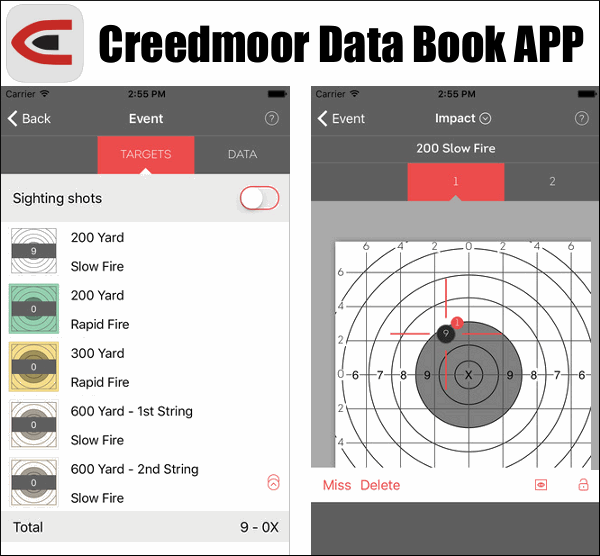
 Tired of hauling around an old-fashioned Score Book and making entries with pencil and paper? Well now you can go digital —
 How would you like to be able to locate any rifle range in North America in a matter of seconds? That it now possible with the mobile Where To Shoot App, available FREE for both iOS (Apple) and Android devices.


 iPhone owners rejoice. The much-awaited iOS Ballistics App for the Kestrel LiNK Weather Meter is now available. Now you can sync your 5700 Series Kestrel wirelessly with your iPhone, iPod, or iPad. With Apple iOS devices being so popular among serious shooters, this is an important software release. Bryan Litz of



 The Kowa adapter comes with two standard rings, one for the 88/77 series scopes and one for the BD/SV/YF series of binoculars. Additional adapter rings for the Genesis 33 and 44 series of binoculars and TSN 660/600/82SV spotting scope eyepieces (except long eye-relief eyepieces) and 21x, 32x, and 50x High Lander eyepieces may be purchased separately. The lightweight adapter is made of an epoxy resin material that will not damage the finish of your iPhone.


