Norma has updated and enhanced its website at www.norma.cc/en/ (the ‘en’ is for English version). Among the many new site features is Norma’s “Ammo Academy”, a technical resource that provides information on: Ballistics, Powder Storage, Barrel Wear, and Bullet Expansion. In addition, the Ammo Academy now links to Norma’s Reloading Data Center, where you’ll find loads for nearly 70 cartridge types including: .223 Rem, .22-250, 6mmBR Norma, 6XC, 260 Rem, 6.5-284, 6.5×55, 7mm-08, .270 Win, .284 Win, .308 Win, .30-06, 300 Win Mag, .338 Lapua Mag and dozens more.
The Ammo Academy’s Ballistics section contains some fascinating technical facts:
After the trigger is pulled, it takes around 0.005 seconds before the firing pin reaches the primer.
From the firing of the primer it takes 0.0015-0.002 seconds until the bullet exits the muzzle.
When the bullet leaves the muzzle, the hot gases surround and overtake the bullet, continuing the acceleration for a few centimeters.
Because the barrel is always angled slightly upwards, the bullet’s flight starts about 3-5 cm below the line of sight.
Norma also offers some good advice about Powder and Cartridge Storage:
To maintain the product quality for as long as possible, you have to keep the powder in a suitable place under suitable conditions. Where possible, store the powder at a constant temperature, ideally between 12 and 15°C (54°F to 59°F), and a relative humidity of 40–50%. If the air is too dry, it will dry out the powder, which will cause the pressure to be higher, thus affecting performance. Also make sure that you close the powder container properly afterwards. Cartridges should be stored under the same ambient conditions to maintain their quality.
A dedicated iPad version of Ballistic (‘Ballistic’ App), a full-featured ballistics calculator for the iPhone, is available for the growing numbers of iPad users. As with the iPhone version, ‘Ballistic’ App for the iPad is “powered by JBM Ballistics” so it offers very precise solutions — typically, at 600 yards, JBM will get you within two or three clicks, provided you have good bullet BC data and reliable MV from your chronograph.
The ‘Ballistic’ App for the iPhone and iPad features a library of over 3,100 projectiles; the library includes the latest 2010 commercial data and G7 military coefficients from Aberdeen Proving Grounds. Along with calculating bullet trajectories, this software has many extra features. There are several different target cards so you can input shot placement and scoring is calculated automatically. There is also a range log (for recording shooting sessions), a mildot and MOA range estimator, and a convenient load database for storing your reloading recipes.
Special features in the iPad edition of ‘Ballistic’ App include: fully integrated split-screen ballistics, favorites, and range log; full-screen, hi-resolution charts; ballistics calculations update automatically as you edit; larger target sizes in range log; and screens can rotate. The iPad Ballistic App (release 2.3.7) costs $19.99. The standard version for iPhone and iTouch units, costs $9.99. To learn more about this software, visit ballistic.zdziarski.com.
by Ian Kenney A week before the fall Allegheny Sniper Challenge (ASC), I first saw Adaptive’s Field Density Altitude Compensator (FDAC). I was impressed by its capabilities and compact size and I managed to take one home from the ASC prize table the very next weekend. The FDAC comes from Adaptive Consulting and Training Services in Stafford, VA. The guys at Adaptive know a thing or two about long-range shooting — many of them are former USMC Scout Snipers. Their long-range shooting and combat experience helped them perfect the FDAC.
At first glance the $39.95 FDAC appears to be just another data card. However, in a number of ways, it is completely different than traditional data cards. The FDAC was designed to be simple and accurate, so that any military or civilian shooter could pick it up and, within minutes, effectively employ it. Anyone familiar with a Midot Master should find the FDAC simple and intuitive. Another plus is that, unlike electronic gadgets, the FDAC doesn’t need batteries or shielding from the elements. You don’t have to carry around extra batteries, chargers, and “ruggedized” weather-proof cases.
FDAC Offers Multiple Cards for More Precise Solutions
The FDAC is quite different than traditional data cards that calculate trajectories based on a single muzzle velocity in a given set of conditions. The problem with those traditional data cards is that, as soon as one variable changes, the card’s ballistic solution becomes less valid. The FDAC solves this problem by employing several cards for different muzzle velocities and using Density Dltitude to compensate for the differences in environmental conditions. For the uninitiated, Density Altitude combines the temperature, humidity, barometric pressure, and elevation figures into one number that is more easily used over a wider range of conditions. Density Altitude can be obtained with a portable weather station (such as a Kestrel). If a portable weather meter is not available, the basic chart printed on the card itself works pretty well even when guessing at the physical altitude and temperature.
FDAC Ballistic Solutions Deliver First-Round Hits in the Field
I first tested the FDAC at Reade Range in Pennsylvania, shooting from 500 to 1000 yards. I used the 2700 fps velocity card that came with my FDAC for the 175 Sierra Match King since that most closely matched what I had loaded up. Starting out with a cold bore shot from the 500-yard line, I obtained the density altitude using my Brunton ADC Pro, and slid the card over until the proper density altitude column was showing. With 3.2 mils of elevation and .2 mils of left wind dialed into my Nightforce 3.5-15×50 (first focal plane) scope, I went for my cold bore shot, hoping the FDAC would put me close. I was happily rewarded with a first round, center mass hit, just a little left of center.
The FDAC continued to shine at longer ranges. FDAC solutions gave me first-round hits at 600 and 800 yards, a second round hit at 1000 yards. Several weeks later I found myself in a field in rural North Carolina once again putting the FDAC to good use this time without any electronic aids. To my surprise, my guestimate of about 500’ for density altitude was pretty darn close to what the Kestrel my friend had was saying also. Just like at Reade Range, the FDAC values delivered cold bore hits that were nearly point of aim = point of impact. That demonstrated how well the FDAC worked in warm weather.
This winter I was able to see how the FDAC performed in cold conditions. In cooler, denser air, a bullet requires more elevation correction to get on target than it would need in warmer temps. So I went out one chilly January morning and confirmed that the FDAC can handle cold conditions. The FDAC solutions once again gave me first round hits from 250 yards to 730 yards. The little DA chart put me in the right vicinity for density altitude just by knowing my altitude and making a guess for the air temperature. Since I’ve started using the FDAC I’ve found that the data is either spot on or within about .2 mils of the correct dope at nearly all distances when using the correct density altitude column. This is very impressive. I found that the FDAC delivered practically the same data as popular digital PDAs and field ballistic calculators. But the FDAC can be even faster in use (once you become familiar with its operation), and, at $39.95, it costs a fraction of what a dedicated electronic ballistics solver would cost. The FDAC is practical, very accurate, inexpensive, compact, lightweight and never needs batteries — what’s not to like?
Below is a SnipersHide Video Review of the FDAC Tool
New Enhanced Milspec FDAC Released this Year
Adaptive has put much R&D into the FDAC and it shows. Thousands of Field Density Altitude Compensators have been provided to soldiers and marines, who are making good use of the devices. At the 2011 SHOT Show, Adaptive unveiled an enhanced FDAC, the MILSPEC-XR. This new version includes a new Density Altitude calculator, extended range dope for the .338LM and .300WM, as well as tools for slope dope and moving targets. Adaptive also offers conversion tables and compatibility charts so that the FDAC can be used with other bullets besides the original FDAC default projectiles. (For FDAC owners, the conversion charts are FREE!) The FDAC is truly one of those few products that I wish I had when I was deployed to Afghanistan. I highly recommend it to any long-range shooter using .308 Win, .300WM or .338LM cartridges (with a mil-based optic). For more information, or to order an FDAC tool, visit the Adaptive website, ACTSVirginia.com, or call (540) 657-8541.
Yet another ballistics App is now available for the iPhone and iPod. iPhone users can download the new Winchester Ballistics App for free. Winchester has taken the features and functionality from its web-based Ballistics Calculator and developed a user-friendly interface for the iPhone. Winchester’s free online ballistics calculator is still available.
The iPhone version of Winchester’s Ballistics Calculator allows users to choose their type of ammunition and compare up to three different Winchester products with easy-to-read, high-tech ballistic charts and graphs. You can customize shooting conditions by entering wind speed and outside temperature, adjust zero marks for sighting in.
To get the free Winchester App, visit the Winchester Ballistics webpage, and click on the photo of an iPhone on the right side of the screen. You will need to have iTunes configured on your computer to download the Winchester App.
Recommended $9.99 ‘Ballistic’ App
While you’re at the iPhones store, you probably want to download the ‘Ballistic’ App by Jonathan Zdziarski. Powered by the JBM Ballistics engine, the $9.99 ‘Ballistic’ App is recommended by Bryan Litz, and it is one of the most sophisticated solvers available. A new $19.99 iPad version of ‘Ballistic’ has just been introduced.
There’s a lot of buzz about ballistics programs for smartphones. Those are handy, to be sure, but most people still need a solid, full-featured program to run on their home computers. Berger Bullets offers a sophisticated ballistics programs for MS Windows computers that works really well, and lets you print out results. Up-to-Date G7 BCs for Berger projectiles are built-in to the program, and the price is right — FREE.
The program is basic enough to be easy to use, but flexible enough to allow you to calculate custom ballistics for your rifle and load. The program accounts for all the basic external ballistic parameters including bullet BC and muzzle velocity, atmospherics, uphill/downhill shooting, etc. The output tabulates velocity, energy and time of flight as a function of range. Bullet path and wind deflection are displayed in your choice of inches, centimeters, MOA or MILS.
Instructions for Program
On the Berger Bullets Blog (1/26/2010), You’ll find a description of program features and a complete set of instructions. Here are instructions for the bullet variables: “The bullet inputs are straightforward. The BC can be entered in reference to either the G1 or G7 standard. You can find the G1 or G7 BC for your bullet either printed on the bullet box label, or on our products page. For accurate results, you should measure the muzzle velocity with a good chronograph. If you don’t have access to a chronograph, you can estimate the muzzle velocity based on your load data.”
Tips for Best Results
Bryan Litz includes tips on getting the most from the Berger Ballistics program. Some of Bryan’s suggestions will also help you when working with other ballistics software:
G1 vs. G7 BC: The accuracy of the ballistic solution is only as accurate as the inputs you give it. The advertised BCs for Berger bullets are established by actual field firing tests over long range and are very accurate. Using the properly referenced BC (G7 vs. G1) for the bullet you’re modeling is important. For any bullet with a boat tail, we recommend using the G7 BC.
Muzzle Velocity: Knowing your true muzzle velocity is important when calculating external ballistics. It’s best to measure your muzzle velocity directly with a chronograph.
Altitude and Atmosphere: If you want a truly accurate long-range trajectory prediction, you can’t ignore atmospheric effects. This is especially true the farther you get from standard conditions (sea level altitude, 59 degrees Fahrenheit, 0% humidity).
Scope Verification: It’s important to verify the most important link between the calculated ballistics and your point of impact: your scope. If the ballistics program calculates 30.0 MOA of drop for a particular shot, and you dial your scope to 30.0 MOA, are you sure it’s giving you exactly 30.0 MOA? In reality, many scopes have enough error in them to cause misses at long range. It’s important to verify the value of your scope clicks by firing groups at short range.
If you have further questions not answered on Berger’s Blog Page, email Bryan.Litz [at] bergerbullets.com. NOTE: If your computer won’t run the program, please download and install this Java update: http://www.java.com/en/download/index.jsp. This is a Windows PC program. You may have problems trying to run it on a MAC in emulation.
Lapua now offers a FREE ballistics program for modern smart phones that run Java Apps. (Unfortunately, that excludes Apple iPhones and Android OS phones, but Lapua says that the majority of smartphones run Java). The program calculates drift and drop, and it corrects for altitude, temp, air pressure, and shot angle. The Lapua Ballistics App also includes a database of Lapua bullet profiles with ultra-reliable radar-derived Ballistic Coefficients. Sound good? Now go get your smart phone. The program must be downloaded with a mobile phone. Open a web browser in your smart-phone and navigate to www.lapua.com/ballistics and choose the correct version for your phone.
Lapua’s exterior ballistic software for mobile phones is capable of predicting trajectories in real time with extreme accuracy. Using Lapua Ballistics, there is no need for checking tables and calculating cosines for inclination compensation (you still have to input the angle). The program also compensates for the effect of cartridge temperature on muzzle velocity and the effect of atmospheric conditions on the projectile’s trajectory.
Lapua Ballistics is based on precise Doppler Radar measurements of actual bullet drag — professional data available only for Lapua bullets. Lapua Ballistics can be installed on all smartphones supporting basic Java (Java MIDP 2.0). NOTE: Apple iPhone and Android platforms do not support Java ME.
Product Preview by Bryan Litz
I’d like to make everyone aware of a new ballistic solver called the Whiz Wheel. The Whiz Wheel, from Accuracy 1st Development Group (Accuracy 1st) is a non-electronic device that calculates ballistic solutions out to transonic range for any small arms bullet. This device, similar to a circular slide-rule, is in the process of being adopted by several military units as a back-up to the electronic PDAs, and even as the primary ballistic solver since it’s faster to get a solution compared to the PDAs.
Whiz Wheel Solver Features include:
Density altitude calculator
Meters/MILS or Yards/MOA output
Trajectory prediction within 0.1 MIL or 0.25 MOA resolution
Wind deflection for any speed and direction
Spin drift
Leads for engaging moving targets
Corrections for inclined shooting
Ability to ‘true’ the solution for variations in MV or BC
Use Different Wheels for Various Cartridges and Loads
The tan colored sleeve is universal, meaning it works with all load-specific wheels. The wheels are interchangeable laser-engraved plastic items. Accuracy 1st offers both “standard” wheels for popular factory-loaded ammo types, as well as custom wheels tailored to your specific bullet, MV, sight height, and twist rate. Each wheel provides a full solution for a single cartridge type and load. Different wheels are required for different cartridges/different loads. This is because the wheel’s solutions depend on bullet BC and muzzle velocity.
How to Use the Whiz Wheel
Finding your come-ups (and windage corrections) with the Whiz Wheel is very simple. Start by solving the density altitude (DA) with the small wheel, or getting it from a Kestrel. Then line up the DA with the range, and the wheel outputs drop. The drop can be corrected for incline via the table on the back of the sleeve. The back of the whiz wheel also calculates the lateral solution elements including wind, spin drift, and moving target leads.
I was heavily involved in the development of the Whiz Wheel and can vouch for the accuracy of the solutions which are generated with a point mass solver and measured G7 BCs. If you have comments or questions about the Whiz Wheel, you can place those in the comments section for this Bulletin post. I’ll try to respond to your questions, time permitting.
Bryan Litz, author of Applied Ballistics for Long Range Shooting, is the Ballistician for Berger Bullets.
Whiz Wheel Pricing for Standard and Custom Loads
To order the Whiz Wheel go to the Accuracy 1st website. A Whiz Wheel Solver with one (1) custom wheel for your load costs $54.95 for civilians, $44.95 for LEO/Military. Each additional custom solver wheel, set up for your specific load, costs $24.95 for civilians, $19.95 for LEO/Military. If you shoot factory ammo, you can purchase the Whiz Wheel with one standard solver wheel — $49.95 for civilians or $39.95 for LEO/Military. A Standard Ballistics solver wheel (set up for a known production load) costs $19.95 for civilians, $14.95 for LEO/Military. Accuracy 1st also offers a package of Solver Sleeve plus three (3) standard wheels — $69.95 for civilians, $49.95 for LEO/Military.
Accuracy 1st Development Group
310 Indianapolis Rd. Building E-4
Mooresville, IN 46158
Phone: 317-834-5480
E-mail: jeffoverholser [at] accuracy1stdg.com
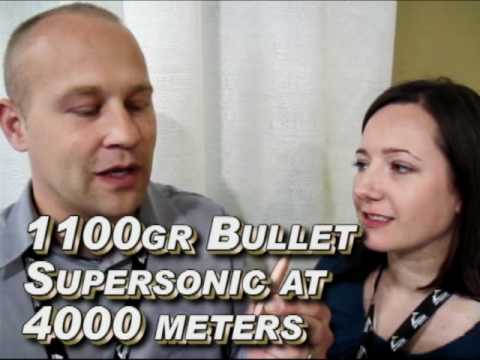
GS Custom Bullets has been producing high-quality hunting and target bullets in South Africa since 1993. GS Custom Bullets specializes in monometal solids. For hunters, the GS solids have proven extremely effective on game animals, including the biggest species on the African continent. The GS match bullets are CNC-machined to very exacting tolerances, offering superior concentricity and uniformity. The large match bullets feature drive bands for reduced engraving force, and an extremely slippery shape for exceptionally high ballistic coefficients. GS has made a special 1,100-grain 50-caliber projectile that has a calculated G1 BC of 1.85! This bullet, launched at 3400 fps, can stay supersonic out to 4,000 meters — that’s 2.49 miles!
Gerard Schultz, founder of GS Custom Bullets, holds a number of patents on his bullet designs. Currently GS Custom is selling to the American market through its South African website, GSCustom.co.ZA. However, this year GS Custom hopes to expand production to North America, starting a production facility in the USA. The North American effort will be lead by Gerard Schultz’s daughter, Gina, and her husband Anthony. They can be contacted through GSCustomUSA.com. We met with Gina and Anthony at SHOT Show in Las Vegas and learned more about these remarkable bullet designs. The video is worth watching. These are no ordinary bullets.
JBM Ballistics (JBM), based in Las Cruces, NM, has provided free online ballistics info for the past 15 years. JBM Ballistics’ sophisticated algorithms deliver extremely reliable ballistics solutions. To complement its software, JBM plans to introduce a new hardware product: the BallistiComp.
Laster this year, JBM will unveil its new BallistiComp, a portable handheld ballistics computer that measures atmospheric temperature and pressure. Once your load data (Bullet BC, Velocity) is entered, the BallistiComp provides instantaneous drop and windage corrections for your load and shooting conditions. Calculated parameters include drop, windage, coriolis, drift and lead, plus terminal information including velocity, energy, time of flight and danger space. All of these parameters are displayed on an LCD display with backlight. Small enough to fit in your pocket, the BallistiComp is packaged in a rugged, watertight Lexan® case, measuring about 3″x5″x1″.
Why Not “An App for That”
Why would JBM produce dedicated hardware when there are good Ballistics Apps that can run on an Apple or Droid smartphone? Battery life is one reason. The single 9-volt battery should last for months (by contrast some smartphones need to be charged every DAY). Importantly, no connection to cell towers or the internet is needed. You could use this unit anywhere on the globe. Lastly, JBM wanted something that was inherently rugged and reliable. Smartphone touch screens are notoriously fragile.
How It Works
Using an 8-button keypad, you enter your firearm, ammunition and zero parameters into the system memory. BallistiComp then calculates the bullet drop and windage correction at the current atmospheric conditions, latitude and altitude (or calculated pressure altitude). BallistiComp continually measures the air temperature and pressure and provides constantly updated drop and drift numbers.
Product Availability
JBM has not yet disclosed a launch date or a suggested price for the new BallistiComp. However, you can download an Operators Manual to learn more about the BallistiComp. JBM cautions: “The manual is just a draft and may change during beta testing”.
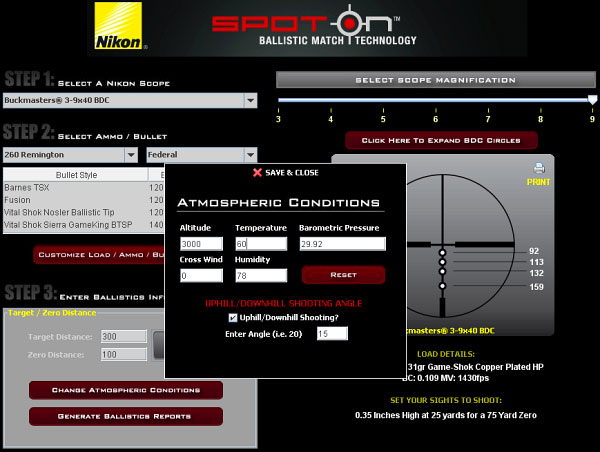
Nikon has adapted its popular Spot On Ballistics software to run on iPhones and iPods. The Spot On iPhone App contains a vast database of factory ammo (both rimfire and centerfire), so you can quickly plot ballistics for your chosen load. If you have a Nikon scope with a Ballistic Drop Compensating Reticle (BDC), you can input the ammo type, zero distance, and atmospheric conditions, and the software will automatically calculate exact target distances corresponding to the hold-over circles on your reticle. Match Technology provides precise aiming points for any Nikon BDC reticle riflescope and precise reference for sighting in other Nikon riflescopes with plex, MilDot or standard crosshair reticles. Nikon’s Spot On App costs $4.99 from the iTunes App store.
Free Web Version of Nikon’s Ballistics App
If you don’t own an iPhone, you can still use the full-featured Spot On program for free on the web. Just log on to NikonHunting.com/spoton and register. Pick a caliber/cartridge and a bullet, then input temp, altitude, and shooting angle. This will give you a ballistics solution and will show the actual yardages corresponding to your BDC reticle hold-over circles. Shown below is the user interface for the FREE web-based version of Spot On.


 A dedicated iPad version of
  A week before the fall Allegheny Sniper Challenge (ASC), I first saw Adaptive’s

 Recommended $9.99 ‘Ballistic’ App
 Instructions for Program
 Lapua now offers a FREE ballistics program for modern smart phones that run Java Apps. (Unfortunately, that excludes Apple iPhones and Android OS phones, but Lapua says that the majority of smartphones run Java). The program calculates drift and drop, and it corrects for altitude, temp, air pressure, and shot angle. The Lapua Ballistics App also includes a database of Lapua bullet profiles with ultra-reliable radar-derived Ballistic Coefficients. Sound good? Now go get your smart phone. The program must be downloaded with a mobile phone. Open a web browser in your smart-phone and navigate to
 I was heavily involved in the development of the Whiz Wheel and can vouch for the accuracy of the solutions which are generated with a point mass solver and measured G7 BCs. If you have comments or questions about the Whiz Wheel, you can place those in the comments section for this Bulletin post. I’ll try to respond to your questions, time permitting.