


High Power Wind Lab — New Wind App for Shooters

This new mobile App helps shooters make the right wind hold and/or dial the correct amount of windage.
High Power Wind Lab Mobile App
Product Review by F-Class John
When it comes to long range shooting, there are few things that make a bigger difference in hitting your target than being able to accurately adjust for wind angle/velocity changes. While it’s one thing to learn how to read the speed and direction of wind by looking at flags, mirage, or surface conditions, it’s another to know what to do with that information (how much to hold off/correct). Knowing how to process changing wind cycles and determine the right hold-off/correction often takes years or decades of practice to master.
Enter the High Power Wind Lab App which stands out as the only dedicated WSYWIG hold-off calculator on the market. Enter a few simple numbers from your favorite ballistic calculator and you’re ready to make adjustments to the wind direction and power dials, leaving the App to do the rest by telling you what your hold should be and if any additional windage should be added to your scope or sights. So after you input the data, then the App suggests the proper correction(s). Download the Wind Lab App for iPhones/iPads via the Apple App Store. NOTE: Android availability via Google Play is pending.
F-Class John Review of High Power Wind Lab App:
Starting up the App you’ll see a simple menu to start a session. The first field is for naming the session. This is helpful for those who save their strings and want to refer to them later but it’s not a required field. The next field is for choosing your target. The App offers the choice of High Power or F-Class targets at mid-range (600 yards) or long range (800-1000 yards). After picking the appropriate target, input the actual distance at which you’ll be shooting. After that, you’ll have to enter your load data. The next two fields will auto-populate for the date and then the shot list once you are done saving shots. The lower section allows you to change what’s visible on the screen (selecting the features you want to view). You can also choose MOA or MILS (milliradians) click values. For wind velocity values, you can select MPH, kilometers per hour, or meters per second.

High Power Wind Lab iPhone App in horizontal mode.
Once you’re done with the setting page, simply tap “start” to bring up the target display. The App can be used in portrait or landscape mode but for the best user experience I’d recommend using it in landscape. On the target page you’ll see four distinct sections. Along the bottom you’ll see the windage dial where you can add or subtract windage simply by moving it left or right. Above the windage dial, you’ll see wind flags that represent the power and above that the direction dial. On the right is the actual target where you see the bracket of where you should hold for the shot based on the information you put in along with color coded brackets to show you the margin of error. The target section also features a great shot calling feature that allows you to tap where you held, then tap where your actual impact was. These shots can be saved for future reference and the ability to do this really helps while you’re training.

Once you get used to how the wind direction and power inputs work the real power of this App comes to life as you can sit and practice what your calls should be from the comfort of your home. There are countless nights where I’ll sit in bed and spend ten minutes moving the power or direction through strange changes just so I can guess or track what happens and the more you practice with it, the more you’ll feel confident when you see those conditions occur at the range.
App Available Now for Apple and Android Mobile Devices
The High Power Wind Labs App is available now for iOS (Apple) mobile devices and Android devices. At $12.99 this App costs less than twenty 7mm match bullets. You could easily save that much in sighters in a couple range sessions. With its ability to calculate nearly every condition you’d encounter at a match you owe it to yourself to download it and start practicing. This interactive application is an invaluable tool for shooters that want to better understand the affects of wind on bullets over long distances.
High Power Wind Lab Description by Accuracy Software Ltd.
High Power Wind Lab is a visualization tool that helps shooters determine wind value based on observed conditions. The App efficiently calculates the sight correction necessary to hit the center of a target. Use High Power Wind Lab on and off the range to explore scenarios and better understand how wind affects the trajectory of a bullet. By interactively changing the wind velocity and wind angle, the display dynamically updates to show the calculated correction and a visualizes a range of possible outcomes if the shooter misreads the wind conditions. By changing the wind velocity and wind angle, the High Power Wind Lab shows the calculated correction as well as possible outcomes if the wind angle and velocity are misread. This interactive tool is invaluable for exploring the interplay of wind direction and velocity and the tradeoffs you need to make when deciding when to shoot and what correction to put on your gun.
The High Power Wind Lab is also a shot plotting and wind plotting tool that shows how wind conditions have developed over time and what the predominant conditions have been throughout a string of fire. That can be a very powerful “hindsight” tool when analyzing your results in a shooting session.
High Power Wind Lab Key Features Include:
| Shot Plotting Score Calculation Record Keeping Tablet Support |
True MOA Corrections Support for Custom Ammunition Library of commonly-used Midrange and Long Range F-Class and High Power Rifle Targets |

Hold-Over Function in High Power Wind Lab
This video, from the creator of the High Power Wind Lab, explains how the Hold-Over feature works. Holding over is commonplace in long range target shooting among those who use scoped rifles. This video demonstrates how to use High Power Wind Lab’s hold-over feature to accurately calculate the needed hold-over when engaging long range targets.
NOTE: If this Hold-Over video is not displaying on your browser, try another browser and/or use this YouTube link: https://youtu.be/WhpyymG15HE




 If you read our lengthy article on
 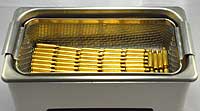 The Brownell’s article explains: “Ultrasonic cleaning uses high-frequency sound waves (generally between 20-80 kHz) to remove a variety of contaminants from objects immersed in a liquid. The result of these high-frequency sound waves is a process called cavitation. These high frequency bursts of ultrasonic energy produce a three-dimensional wave of alternating positive and negative pressure areas as the sound wave passes through the solution. During negative pressure, microscopic cavitation bubbles form and will continue to grown until they reach resonant size. As the positive sound wave passes, the pressure rises rapidly and implodes these tiny bubbles. Before these minuscule bubbles implode they store a tremendous amount of energy. These bubbles can be as hot as 10,000 degrees and have as much as 50,000 lbs per square inch of pressure. This sounds alarming, but you have to remember that these bubbles are microscopic in nature and pose no harm to anything, unless you are a carbon /powder residue deposit on a cartridge case!
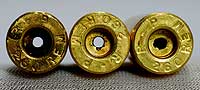 When this cavitation bubble implodes near your brass case, it transforms the bubble into a jet about 1/10th of its size. This jet of energy can travel as fast as 400 km/hour. At 43 kHz, as is the frequency for our L & R HCS 200 ultrasonic cleaner, this is happening 43,000 times per second. This micro-burst of extreme energy is responsible for removing contaminants from the surface of your cartridge brass. Ultrasonic cleaning can reach into crevices and inaccessible areas and remove surface debris that can’t be cleaned by any other process.”


