|
|
December 14th, 2009
There are a variety of ballistics programs that can be used with handheld PDAs, and even Apple iPhones. But Bryan Litz, author of the new Applied Ballistics for Long Range Shooting book, has come up with something bigger and better. Employing the powerful Texas Instruments (TI) Voyage 200 graphing calculator, Bryan has created a Mobile Ballistics Solution (MOBALL) that is more sophisticated (and accurate) than typical PDA-based programs.

MOBALL includes TI graphing calculator and ballistics software. Kestrel windmeter NOT included.
Bryan tells us: “The Mobile Ballistics Computer (MOBALL) was created for one purpose: to provide shooters with the most accurate and complete ballistic firing solution possible for application in the field.” MOBALL runs on a TI graphing calculator — a sturdy, stand-alone, non-network device. That means you don’t need long-term cell phone contracts, expensive data plans, or weekly OS “updates” and patches. The TI also delivers long run-time on ordinary AAA batteries. That’s a big advantage over most laptop computers, which run out of “juice” after only 4-5 hours in the field.
According to Bryan, what sets MOBALL apart from other “deployable” ballistics calculators is that: “MOBALL provides a complete ballistic solution, with the ability to account for every major and minor variable affecting a bullets trajectory. In addition to the standard variables like atmospherics, uphill/downhill angles and wind, MOBALL also has the ability to account for more subtle ballistic effects like spin drift, Coriolis effect, and multiple winds in up to 3 zones.”
Importantly, Bryan’s MOBALL device can employ Ballistic Coefficients (BCs) referenced to the G7 standard. Compared to the older G1 BC model, the G7 BC standard better matches the characterics of the long, boat-tail bullets actually used by long-range shooters. Trajectories calculated using the G7 BC are more accurate for long-range bullets because the G7 BC doesn’t vary with velocity like the conventional G1 BC.
 
The difference between G1 and G7 BCs is explained online in the Berger Blog article A Better Ballistic Coefficient. The subject is also discussed in detail in Chapter 2 of Bryan’s Applied Ballistics book.
 At $290.00, MOBALL isn’t the least expensive option for a mobile ballistics device, but that price includes the TI Voyage 200 graphing calculator, worth $180.00 by itself. Bryan adds: “As already mentioned, the feature set is extensive, and the software is much more sophisticated than most ballistics programs designed for PDAs. The solution is VERY accurate (CLICK to download MOBALL Accuracy Report). Also, the TI Voyage 200 is an impressive device itself, capable of solving advanced engineering and math problems. If you’re a high school/college student, engineer, etc, the TI Voyage 200 can be used for many school and work tasks unrelated to ballistics.” At $290.00, MOBALL isn’t the least expensive option for a mobile ballistics device, but that price includes the TI Voyage 200 graphing calculator, worth $180.00 by itself. Bryan adds: “As already mentioned, the feature set is extensive, and the software is much more sophisticated than most ballistics programs designed for PDAs. The solution is VERY accurate (CLICK to download MOBALL Accuracy Report). Also, the TI Voyage 200 is an impressive device itself, capable of solving advanced engineering and math problems. If you’re a high school/college student, engineer, etc, the TI Voyage 200 can be used for many school and work tasks unrelated to ballistics.”
Save $20 on MOBALL and Ballistics Book Combo
As a special Holiday Offer valid through December 31, 2009, you can save money when purchasing MOBALL and Bryan’s Applied Ballistics book together. The book and MOBALL unit are being offered as a Holiday Combo Set for $309.95. That’s a $20 savings over the $329.95 cost of purchasing both book and MOBALL unit separately.
September 26th, 2009
 We live in a digital, electronic era. The very story you’re reading right now consists of digital data packets transmitted electronically around the globe. Because of cost factors, 99+% of shooting matches in the USA still rely on old-fashioned manual scoring methods. However, target scoring can be done faster and more precisely with electronic scoring systems. Olympic and international CISM shooting competitions now employ electronic target systems. And electronic scoring is widely used in Europe already. We live in a digital, electronic era. The very story you’re reading right now consists of digital data packets transmitted electronically around the globe. Because of cost factors, 99+% of shooting matches in the USA still rely on old-fashioned manual scoring methods. However, target scoring can be done faster and more precisely with electronic scoring systems. Olympic and international CISM shooting competitions now employ electronic target systems. And electronic scoring is widely used in Europe already.
Below is a video showing an electronic scoring system developed by Norway’s Kongsberg Mikroelektronikk AS. Watch as a prone shooter puts five rounds on a 300m target. You can see the group form on the video screen at his shooting station. He’s a good shooter (with an accurate rifle). The first three shots are touching.
As you can see from the video, viewing shots on the monitor is easier than using a spotting scope and waiting for targets to be marked. The electronic target eliminates the need for a crew of target pullers in the pits.
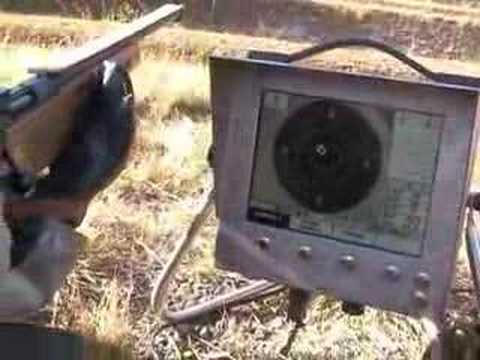
The Kongsberg system, like the electronic systems produced by Sius Ascor of Switzerland, do more than just display shot locations to the shooter. The target units automatically calculate scores, which are transmitted to a central computer. This can provide updated competitor rankings, and can even display the results to event spectators on large view screens.


CLICK HERE for a longer streaming Flash VIDEO showing how electronic target systems work. This video, produced by Sius Ascor, shows olympic target systems in action.
September 8th, 2009
Remington Arms offers a handsome collection of photographic “wallpapers” you can use as backgrounds for your computer’s desktop. There are dozens of high-resolution photos, all free for the downloading. Below is a sample from the 2009 Wallpaper collection.

Remington Wallpapers are available in 640×480, 800×600, 1024×768 and 1280×1024 pixel sizes and can be used on both PC and Mac computer systems. After downloading each file to your computer, you can set the image as your desktop background via your system control panel (or, with some operating systems, just open the picture file, right click on the image, and designate the photo as “desktop background”.)
Be sure to look through the wallpaper collections for years 2008 and earlier, as well as the current 2009 collection. There are 12 wallpapers per year. Below are previews of images from the past five years (2004-2008).
CLICK HERE for 2008 and Older Wallpaper Sets.
Photos © copyright Remington Arms Co., All Rights Reserved.
March 19th, 2009
Imagine if you could have a powerful Windows-based portable PC that would run your ballistics programs, sync with your chronograph, run Excel spread sheets (with reloading logs), connect wirelessly to the internet for weather info and load data, AND provide built-in GPS Navigation. OK, now imagine having all those capabilities (plus a camera) in a 1.4-pound computer with a compact 9.65″ x 4.72″ footprint!

Sound impossible? Not any more. The new Sony Vaio P-Series can do everything we’ve described and still fit easily inside a range-bag or vehicle glove-box. About as thin as a deck of cards, this remarkable little computer can perform a myriad of tasks for the shooter and outdoor sportsman. On the way to the range, you can use it for in-vehicle navigation — with its built-in GPS it provides turn-by-turn instructions (no internet connection needed for GPS services). Once you get to your destination you can then hook it up to your chronograph, or use it to run ExBal or other ballistics program.

Pros and Cons of Vaio P
We really like that fact that the Vaio P is so small and light. The portability means the device gets used much more, providing a web connection nearly everywhere you go (in urban areas). This editor has a 9-lb laptop with a 17″ screen. It’s a nice unit, but it rarely gets used because it’s so darn big and heavy. Conversely, I can easily bring the Vaio P anytime I’m in the car.

The screen on the Sony Vaio P, though it offers 1600 x 768 resolution, is quite small, and won’t display most web pages without scrolling vertically. If you have a target-cam, you’ll be much happier using a standard-size laptop for a display. The 1600×768 resolution stuffs so many pixels in a small space that words are hard to read and there’s no quick path to change the resolution. However, when you’re on the web, you can use the browser’s zoom function to enlarge font size.
The Vaio P comes with a 60 gig conventional hard drive. We wish a Solid State Drive (SSD) was standard. A SSD is more shock-resistant and would consume less power. However, Sony does offer 64 GB or 128 GB SSDs as extra-cost options. As it is, the Sony Vaio P is pretty expensive at $899.00 street price.
For operating systems you have a choice of Windows Vista Premium or Vista Home for the Vaio P. We wish Sony gave buyers an XP or Linux OS option. Dell offers these choices with the Dell Mini laptop.
A Unique Product
The Vaio P is not a perfect product. At about $900.00, it’s expensive as mini-laptops go. However, when you consider that this can replace a GPS Navigation unit, a PDA (for your ballistics program), a Blackberry, and a digital camera, the Vaio P is an attractive alternative. Since it’s small enough to be truly portable, we think a device like this will actually get used a lot more than a big, heavy laptop. And if the Vaio P proves to be something you use virtually every day (like your cell-phone), then it’s well worth the investment. The Vaio P was a CNET “Best of CES” Award winner for 2009.

August 28th, 2008
Remington Arms offers a handsome collection of photographic “wallpapers” you can use as backgrounds for your computer’s desktop. There are dozens of stunning, high-resolution photos, all free for the downloading.

Remington Wallpapers are available in 640×480, 800×600, 1024×768 and 1280×1024 pixel sizes and can be used on both PC and Mac computer systems. After downloading each file to your computer, you can set the image as your desktop background via your system control panel (or, with some operating systems, just open the picture file, right click on the image, and designate the photo as “desktop background”.)

Be sure to look through the wallpaper collections for years 2007 and earlier, as well as the current collection. The 2001 collection has gorgeous product shots of rifles and shotguns, while the 2005 and 2006 collections feature stunning outdoor nature photography. (There are 12 wallpapers per year. Below are previews of half the images from 2005 and 2006).
CLICK HERE for 2007 and Older Wallpaper Sets.

Photos © copyright Remington Arms Co., All Rights Reserved.
|


